


The Bambu X2D has arrived, and the 3D printing community is rightfully buzzing. A genuine dual-nozzle system in a sub-$1K printer ($649, or $899 as a Combo with the AMS 2 Pro) changes the game—multicolor prints without filament swaps, simultaneous material combinations, and production-speed improvements that matter for serious makers. But is it the right machine for you? And how does it really stack up against the P1S and other contenders?
This guide cuts through the hype. We'll compare the X2D's specs and real-world performance, show you when dual-nozzle pays off, and help you decide whether to upgrade or stick with what you have.
Why Dual-Nozzle Matters (And Why It's Harder Than It Looks)
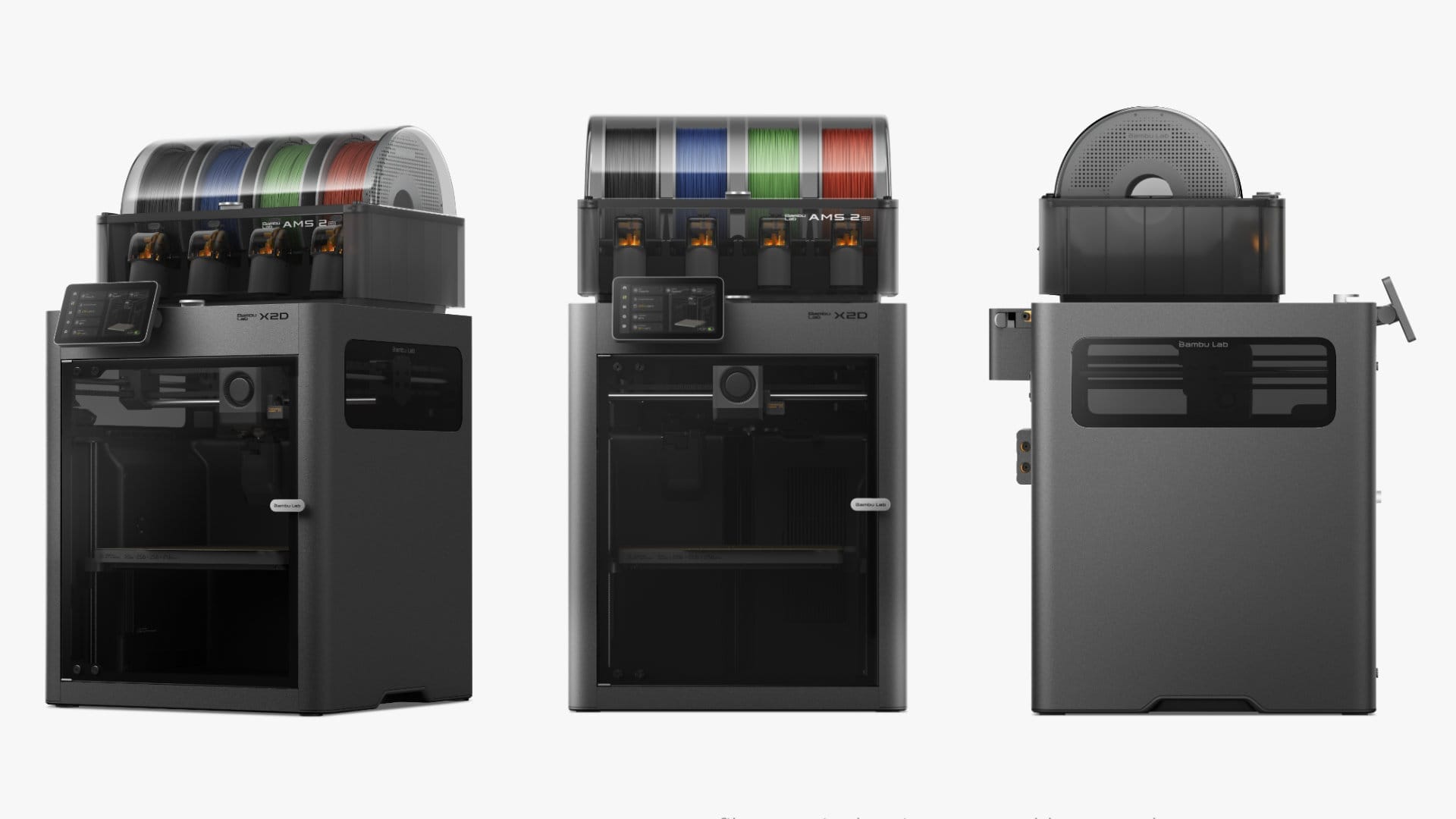
Single-nozzle 3D printers have ruled for years. They're simple, reliable, and—by swapping filament—you can print in almost any color or material. The tradeoff? Time. A two-color print on a single-nozzle machine means pausing mid-print, unloading one filament, loading another, and resuming. For complex multicolor models, you're looking at five, ten, or even twenty material changes.
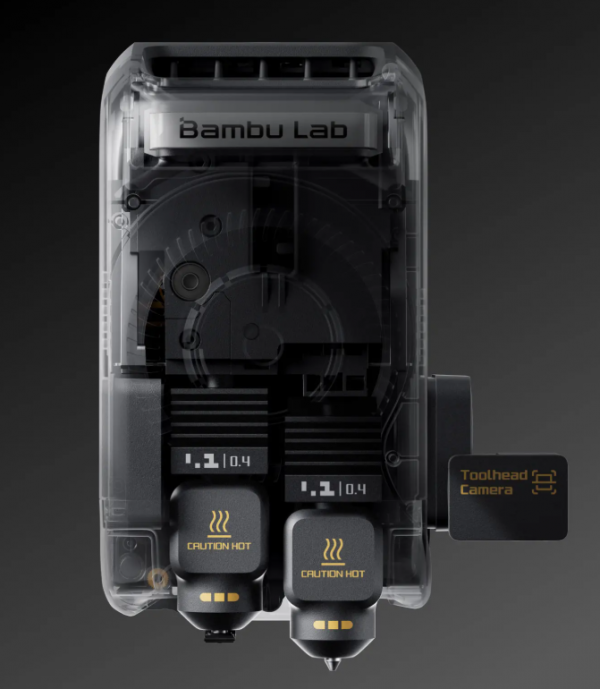
Dual-nozzle systems bypass this entirely. Both nozzles heat simultaneously; the printer switches between them mid-layer. Multicolor prints finish in one go. You can combine materials—flexible TPU trim on a rigid PLA part, for instance—without breaking the job into separate prints.
Sounds perfect, right? The catch: dual-nozzle adds mechanical complexity, calibration overhead, and the real risk of nozzle collision if geometry isn't perfectly managed. Most budget dual-nozzle printers have struggled with oozing, stringing, or poor layer adhesion between color transitions. Bambu's X2D takes a calculated swing at solving this.
Bambu X2D Specifications at a Glance
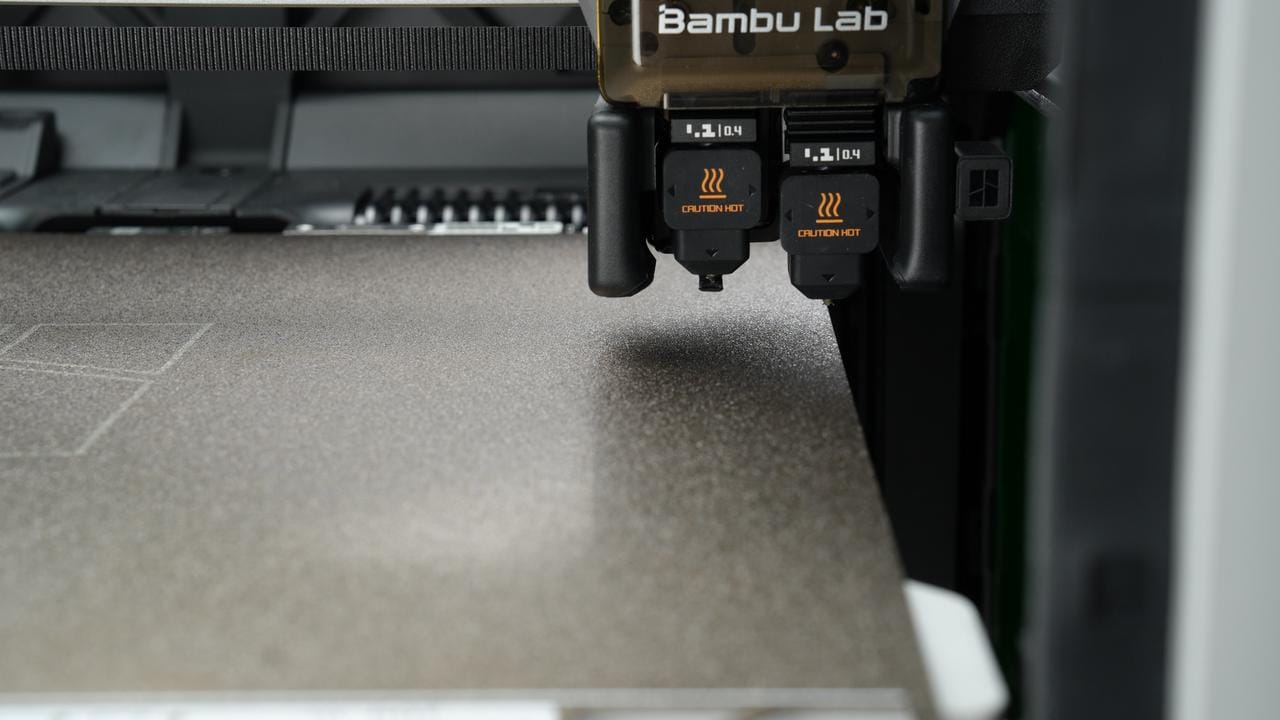
- Build Volume: 256 × 256 × 260 mm with the main nozzle (235.5 × 256 × 260 mm when printing with both nozzles)
- Nozzles: Dual nozzle: a direct-drive main nozzle plus an auxiliary nozzle, switched mechanically (0.4 mm stock, quick-swap)
- Max Nozzle Temp: 300°C
- Heated Bed: 120°C max
- Chamber: Actively heated, up to 65°C
- Print Speed: Up to 1,000 mm/s on the main nozzle, 200 mm/s on the auxiliary; 20,000 mm/s² acceleration
- Materials: PLA, PETG, ABS, ASA, TPU, PA, PVA/HIPS supports and CF/GF composites (not PC or high-temp PA-CF, which need 350°C+)
- Multicolor: AMS 2 Pro compatible; the Combo ships with one
- Price: $649 (X2D) · $899 (X2D Combo with AMS 2 Pro), US launch pricing, April 2026
X2D vs. P1S: The Direct Comparison
The P1S remains Bambu's best-selling single-nozzle workhorse. If you already own one, the question isn't specs—it's workflow.
Verdict: The P1S is proven and cheaper. The X2D adds a second nozzle, an actively heated chamber and a higher top speed (1,000 mm/s vs the P1S's 500 mm/s), and you pay a premium for all three.
Real-World Use Cases: When X2D Wins
Miniature Gaming Models with Base Painting — Tabletop RPG enthusiasts and Warhammer 40K hobbyists love X2D for one reason: print your mini in one color, base in another, all in one job. No post-assembly gluing. No hand-painting base layers. Print it, unmask, done.
Prototype Iterations — If you're designing a part with multiple materials (rigid body + flexible snaps), X2D lets you test geometry and material interaction in a single overnight print instead of three separate jobs.
Production Runs with Minimal Downtime — Contract manufacturers and small shops see ROI fast. Multicolor prints at scale = fewer material-swap interruptions = higher hourly utilization.
Artistic and Architectural Models — Designers appreciate the ability to print accent colors, trim, or detail layers without post-processing. A building model can ship with integrated color gradation.
TPU + PLA Hybrid Parts — Phone cases, flexible hinges, or protective gaskets. X2D lets you create true multi-material assemblies that would require gluing or complex assembly otherwise.
Real-World Performance: What Users Are Reporting
Five months after launch, the early-owner consensus is cautiously optimistic—with caveats.
Strengths: - Nozzle switching is reliable; the firmware handles offset calibration better than early user expectations. - Multicolor prints exit clean; oozing between nozzles is minimal with proper temperature tuning. - Bed adhesion with dual-nozzle geometry is solid on textured nozzles. - The included cloud slicing integrates dual-nozzle support natively—no fiddling with Cura plugins.
Weaknesses: - Initial calibration takes 20–40 minutes; if you're upgrading from a P1S, the learning curve is real. - Nozzle offset drifts over ~50 print hours; recalibration quarterly is prudent. - The secondary nozzle can clip support material if geometry is tight. Advanced users mitigate this in slicer settings; beginners sometimes learn the hard way. - Filament jam risk is slightly higher with dual feed systems. Bambu's AMS (Automatic Material System) is nearly essential—manual dual-material loading is error-prone.
Print Quality: Layer Adhesion and Surface Finish
X2D prints show good layer adhesion between nozzle transitions. Color boundaries are crisp; there's no visible seam or weak point where one nozzle hands off to the other. In practice, this translates to models that survive stress testing without delamination at transition zones.
Surface finish is standard Bambu: smooth on the primary layer side, slightly textured on support-contact faces. The X2D doesn't introduce new artifacts, which is encouraging for a new platform.
Materials: What You Can Realistically Print
- PLA + PLA ✓ (easiest; no special setup)
- PLA + PETG ✓ (slight temperature tuning needed; works well)
- PLA + TPU ✓ (firmware handles nozzle temperature transitions cleanly)
- PETG + TPU ◐ (possible but requires aggressive temperature ramping; not recommended for production)
- Nylon or CF/GF-filled ✓ on the main nozzle (PC and high-temp PA-CF need 350°C+, which the X2D doesn't reach)
In short: stick with PLA and PETG for your primary, and TPU/TPA for secondary, and you'll rarely encounter problems.
Cost-of-Ownership and ROI
Buying the X2D is a $649–$899 bet. When does it pay off?
Cost Baseline : - X2D cost: $649 standalone, $899 as the Combo with the AMS 2 Pro - Assume 40-hour print months (enthusiast schedule) = ~480 print hours/year - Material cost is identical; electricity negligible - Maintenance cost (nozzles, wear) is slightly higher due to dual-nozzle complexity
Payoff Scenarios: 1. Hobbyist (printing minis, art): Payoff is creative, not financial. If multicolor prints improve your work enough to justify the upgrade cost, go for it. Timeline: never (unless you sell prints). 2. Micro-producer (Etsy, small shop): If multicolor prints reduce prep time by 2–3 hours per week and you charge $20–30 for labor/materials, the X2D pays for itself in 6–12 months. 3. Contract manufacturer: With 60+ print hours per month and dual-material jobs, ROI is 3–4 months.
For most hobbyists, the X2D is a want, not an investment. For anyone selling prints, the math shifts quickly.
Common Setup Mistakes (And How to Avoid Them)
- Skipping nozzle offset calibration: Do it. Every time you change nozzles or after 50 print hours. Five minutes saves ten failed prints.
- Overheating the secondary nozzle: If it's idle, keep it 10–15°C cooler than the primary. Reduces oozing and extends nozzle life.
- Ignoring filament sensor redundancy: Dual-nozzle extrusion means dual jam risk. Make sure both filament paths are threaded cleanly and tension is even.
- Printing support with the secondary nozzle: Let the primary nozzle handle support. Less jamming, cleaner tearaway.
Alternatives Worth Considering
Prusa MK4S with MMU3 (~$799 + $299 = $1,098): Single nozzle, but the Prusa Multi-Material Unit 3 is mature, battle-tested, and well-documented. Slower material swaps than dual-nozzle, but proven reliability.
Ultimaker S5 Pro Bundle (~$4,500): Industry standard. Overkill for hobbyists; worth it only if you're already a professional shop.
Snapmaker U1 (~$849): A toolchanger rather than a dual nozzle: four independent toolheads, so four colors with no flushing between them. It's what I run next to my own X2D for multicolor work. Snapmaker U1 direct from Snapmaker · on Amazon. Full comparison: Snapmaker U1 vs Bambu X2D.
For most people in Geeky Inc's audience—makers, tabletop hobbyists, designers—the X2D and P1S are the realistic picks. If you want true dual-nozzle at a fair price, X2D is the best current option.
The alternative I actually run next to my X2D is the Snapmaker U1 (I bought two). Watch my X2D vs U1 side-by-side on TikTok →
Should You Upgrade from P1S to X2D?
Upgrade if: - You print multicolor designs regularly (gaming minis, architectural models, art prints). - You've hit the productivity ceiling and want to consolidate 2–3 print jobs into one overnight run. - You're willing to invest 1–2 hours in learning nozzle calibration.
Don't upgrade if: - Your P1S is running perfectly and you're happy with single-color output. - Budget is tight; the price difference buys a lot of filament and other tools. - You print primarily high-temp engineering materials like PC; the X2D tops out at 300°C.
Buying the X2D: Where to Start
Bambu sells the X2D ($649) and the X2D Combo ($899) direct from its official store. In the US, MatterHackers also stocks the X2D.
If you plan to print multicolor regularly, get the Combo. It bundles the AMS 2 Pro for $250 more than the standalone printer and feeds four spools automatically, which is a huge quality-of-life upgrade over swapping filament by hand.
Prefer a US retailer to buying direct? Get the X2D from MatterHackers.
Final Verdict
The Bambu X2D is a genuinely capable dual-nozzle printer at a price point that makes sense for enthusiasts and micro-producers. It's not a miracle machine—setup and calibration matter—but it solves real problems for people who want multicolor prints without the friction of manual material swaps.
If you're already happy with a P1S, it's not a must-have. But if you're buying your first Bambu or ready to level up your print game, the X2D is worth serious consideration.
Ready to take the leap? Get the X2D from MatterHackers or direct from Bambu's store.
Geeky Inc Minis
Tiny dragons, kitsune and golems for your shelf.
Multi-color 3D-printed minis, printed, finished and shipped by us. $2.50 each, or 12 for $23.
Browse the minis →
Member discussion